
Case Study: Optimizing ComfyUI Workflows
7/4/2026 · 25 min read

5
متخصص هوش مصنوعی و تولید محتوا در Axeto. روی Prompt Engineering، Flux، ComfyUI و workflowهای تصویر/ویدیو AI تمرکز دارد.
نکات کلیدی
- ترکیب هوشمندانه مدل پایه (Checkpoint Model) و LoRAهای تخصصی (مانند add_detail, epi_noiseoffset, more_details) برای افزایش چشمگیر کیفیت و جزئیات تصویر ضروری است.
- استفاده از تکنیک Latent Upscale در ComfyUI برای افزایش مقیاس تصویر (مانند 2x) با حفظ و بهبود جزئیات، بسیار مؤثرتر از Upscale پیکسلی است.
- تنظیم دقیق پارامترهای سمپلر (مانند DPM++ 2M SDE Karras با 30 مرحله) و CFG Scale (مقدار 7) برای هدایت مدل به سمت خروجی مطلوب و واقعگرایانه حیاتی است.
- مرحله بازتولید (Refinement) پس از Upscale با دینویز پایین (0.3) به مدل امکان میدهد تا جزئیات جدید را در ابعاد بزرگتر تثبیت کند و بافتها را بهینه سازد.
- پرامپتنویسی دقیق و جامع، هم برای پرامپتهای مثبت و هم منفی، نقش کلیدی در کنترل خروجی و جلوگیری از ناهنجاریها دارد.
Axeto را امتحان کنید
مقاله را خواندید — حالا با ابزار واقعی Axeto خروجی بگیرید.
In the fast-paced world of digital content creation, speed, quality, and efficiency are paramount. Generative AI tools like ComfyUI empower artists and content creators to bring their ideas to life with unprecedented precision and flexibility. This case study delves into an optimized ComfyUI workflow specifically designed for generating high-quality images with intricate details. Our goal is to demonstrate how combining advanced models, specific techniques, and fine-tuned settings can achieve results that exceed initial expectations.
The Challenge
Generating high-quality images with intricate details, especially at scale and with the need for reproducibility, has always been a significant challenge in visual content creation. Artists and designers often face the following issues:
1. Low Initial Quality: Images generated by base AI models may lack sufficient detail, realistic textures, and the required resolution.
2. Inconsistent Style: Maintaining a consistent visual style across a series of images, especially when varying prompts, is difficult.
3. Time-Consuming Process: Manually refining images and iterating on the generation process to achieve the desired outcome takes a considerable amount of time.
4. Technical Expertise Required: Using advanced tools like Stable Diffusion or ComfyUI can be complex for novice users, requiring a deep understanding of parameters and nodes.
5. Difficulty in Generating Fine Details: Producing small details like skin texture, hair, realistic eyes, or clothing intricacies is often challenging and requires specific techniques.
6. Managing Multiple Models: Selecting and combining different models (such as base models and LoRAs) to achieve the best results requires extensive experience and experimentation.
7. Resource Optimization: Efficiently utilizing hardware resources (GPU) to generate high-quality images faster, without compromising quality, is a challenge.
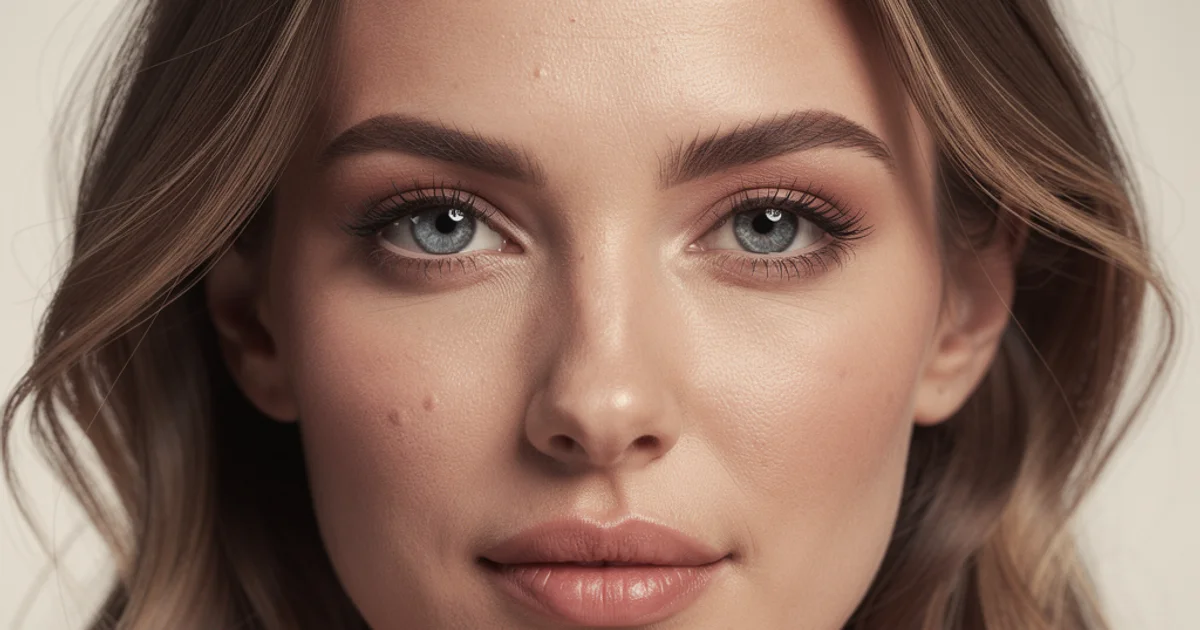
In this case study, we aimed to create a ComfyUI workflow capable of addressing these challenges, leading to the generation of studio-quality images with stunning detail and rich textures. The primary focus was on generating a realistic portrait of a woman to best test the complexities involved in facial, hair, and skin details.
The Solution
To overcome the aforementioned challenges, a multi-stage, optimized workflow was designed and implemented in ComfyUI. This workflow leverages a smart combination of several advanced models and techniques to maximize output quality and detail.
Key Workflow Stages:
1. Initial Generation:
* Checkpoint Model: The realisticVisionV60B1_v60B1.safetensors model was used. This model was chosen for its ability to produce realistic, high-quality images, particularly for portraits.
* LoRA (Low-Rank Adaptation): To enhance detail and realism, three LoRAs were applied simultaneously:
* add_detail.safetensors: For adding fine details to the image.
* epi_noiseoffset2.safetensors: To improve contrast and depth, and add subtle noise that aids realism.
* more_details.safetensors: For further enhancing overall image detail.
* Prompt: A precise positive prompt and a comprehensive negative prompt were used to guide the model towards the desired quality and prevent anomalies. (Full details are provided in the "Complete Prompt" section.)
* Sampler: DPM++ 2M SDE Karras was used with 30 sampling steps. This sampler was chosen for its ability to produce high-quality images while preserving details.
* CFG Scale: A CFG Scale of 7 was set to ensure the model adheres well to the prompt without overly restricting its creativity.
* Image Size: The initial image was generated at 768x1024 pixels.
2. Quality and Detail Enhancement with Upscale (Refinement):
* Latent Upscale: The image generated in the first stage was upscaled in Latent space using Latent Upscale to 1536x2048 pixels (2x). This method of upscaling in Latent space preserves quality and detail better than pixel-space upscaling.
* Upscaler Model: The 4x_NMKD-Siax_200k.pth model was used for this stage. This is a specialized upscaler model designed to enhance image clarity and detail.
* Denoise: A denoise value of 0.3 was set. This value allows the model to add new details to the upscaled image while preserving the original structure.
* Refinement (Re-sampling): After upscaling, the image was re-sampled with the same base model and initial LoRAs, but with fewer sampling steps (20 steps) and a denoise value (0.3). This stage allows the model to optimize textures and fine details at the larger resolution.
3. Post-processing:
* Convert to RGB: The final image was converted from Latent space to pixel space (RGB).
* Save: The final high-quality image was saved.
Advantages of this Approach:
- Significant Quality Improvement: The combination of a robust base model, specialized LoRAs, and Latent space upscaling results in images with high resolution, rich details, and realistic textures.
- Precise Control: Detailed prompts and parameter settings provide complete control over the final output.
- Efficiency: By using ComfyUI, this workflow can be automated, significantly reducing generation time.
- Flexibility: This workflow is easily modifiable and adaptable to different needs. Models, LoRAs, prompts, and settings can be changed to achieve diverse results.
This solution not only addresses quality and detail challenges but also provides a powerful framework for advanced visual content generation using generative AI. With Axeto, you can access and easily execute these complex workflows without requiring deep technical knowledge.
Complete Prompt
One of the most crucial factors in achieving optimal results in AI image generation is precise and comprehensive prompt writing. In this case study, the following prompts were used to guide the model towards generating a realistic and aesthetically pleasing portrait:
Positive Prompt:
RAW photo, 8k, best quality, master piece, (realistic, photo-realistic:1.3), ultra detailed, intricate details, high resolution, sharp focus, professional photography, studio lighting, soft natural light, perfect face, perfect eyes, perfect lips, perfect skin texture, perfect hair, award winning, hyperrealistic, intricate, ethereal, (a beautiful young woman:1.2), elegant, sophisticated, looking at viewer, soft smile, delicate features, long flowing hair, wearing a stylish dress, blurred background, depth of field, cinematic, film grain, (symmetrical face:1.1), (anatomically correct:1.1), (perfect hands:1.1), (perfect fingers:1.1), (well-defined muscles:1.1)Positive Prompt Analysis:
- Quality and Resolution: Phrases like
RAW photo, 8k, best quality, master piece, ultra detailed, intricate details, high resolution, sharp focus, professional photography, studio lightinginstruct the model to produce an image of the highest possible quality, with abundant detail and professional lighting. - Realism:
(realistic, photo-realistic:1.3), hyperrealisticemphasize realism with a high weight (:1.3). - Facial and Body Details:
perfect face, perfect eyes, perfect lips, perfect skin texture, perfect hair, symmetrical face:1.1, anatomically correct:1.1, perfect hands:1.1, perfect fingers:1.1, well-defined muscles:1.1specifically focus on the details and perfection of facial and body features. These phrases help the model avoid generating anomalies in these areas. - Main Subject:
(a beautiful young woman:1.2), elegant, sophisticated, looking at viewer, soft smile, delicate features, long flowing hair, wearing a stylish dressdescribes the main subject (a beautiful young woman) and her appearance and demeanor. The weight(a beautiful young woman:1.2)increases the importance of this part. - Background and Lighting:
blurred background, depth of field, cinematic, film grain, soft natural lightrefer to artistic and technical aspects of photography, contributing to depth of field and a cinematic feel. - Reinforcing Phrases:
award winning, intricate, etherealare used to enhance artistic quality and visual appeal.
Negative Prompt:
(worst quality, low quality, normal quality, lowres, low resolution, blurry, fuzzy, pixelated, jpeg artifacts:1.4), (bad anatomy, bad hands, bad fingers, deformed, disfigured, extra limbs, missing limbs, malformed limbs, twisted, mutated, ugly:1.3), (cropped, out of frame, out of focus, watermark, signature, text, logo, NSFW:1.2), (monochrome, grayscale, sepia, 2tone, 3tone, multiple colors, multiple tones:1.1), (poorly drawn, amateur, cartoon, anime, 3D render, CGI, illustration, painting, sketch, drawing, graphic, digital art:1.0), (bad eyes, crossed eyes, lazy eye, extra eyes, missing eyes, bad face, extra face, missing face, bad mouth, extra mouth, missing mouth, bad nose, extra nose, missing nose:1.0), (duplicate, cloned, copied, error, error lines, error artifacts, error codes:1.0), (oversaturated, undersaturated, oversaturated colors, undersaturated colors:1.0)Negative Prompt Analysis:
- Low Quality:
(worst quality, low quality, normal quality, lowres, low resolution, blurry, fuzzy, pixelated, jpeg artifacts:1.4)with high weight, prevents the model from generating low-quality images. - Anatomical Anomalies:
(bad anatomy, bad hands, bad fingers, deformed, disfigured, extra limbs, missing limbs, malformed limbs, twisted, mutated, ugly:1.3)are specifically used to prevent common AI generation anomalies like deformed hands and fingers. - Compositional Issues and Watermarks:
(cropped, out of frame, out of focus, watermark, signature, text, logo, NSFW:1.2)are used to prevent common framing and focus issues, as well as any unwanted watermarks or text. - Undesired Styles:
(monochrome, grayscale, sepia, 2tone, 3tone, multiple colors, multiple tones:1.1), (poorly drawn, amateur, cartoon, anime, 3D render, CGI, illustration, painting, sketch, drawing, graphic, digital art:1.0)deter the model from generating images in non-realistic styles or with low artistic quality. - Facial Anomalies:
(bad eyes, crossed eyes, lazy eye, extra eyes, missing eyes, bad face, extra face, missing face, bad mouth, extra mouth, missing mouth, bad nose, extra nose, missing nose:1.0)are specifically used to prevent common issues in face generation and facial features. - Generation Errors:
(duplicate, cloned, copied, error, error lines, error artifacts, error codes:1.0)to prevent model generation artifacts. - Color Issues:
(oversaturated, undersaturated, oversaturated colors, undersaturated colors:1.0)to maintain natural color balance.
The combination of these precise, weighted prompts allows the model to focus intently on desired details, avoid errors and anomalies, and ultimately achieve an image of exceptional quality. These prompts are an excellent example of how to use advanced prompting techniques to achieve precise and artistic results.
Settings
In this section, we detail the technical settings and parameters used in the ComfyUI workflow. These settings play a crucial role in the final image's quality and characteristics.
| Parameter / Node | Value / Type | Description |
|---|---|---|
| _Checkpoint Loader_ | ||
| Checkpoint Name | realisticVisionV60B1_v60B1.safetensors | Base model for generating realistic images. |
| _LoRA Stacker_ | ||
| LoRA 1 Model | add_detail.safetensors | For adding fine details. |
| LoRA 1 Strength | 0.7 | Influence of the first LoRA. |
| LoRA 2 Model | epi_noiseoffset2.safetensors | For depth and contrast. |
| LoRA 2 Strength | 0.7 | Influence of the second LoRA. |
| LoRA 3 Model | more_details.safetensors | For further detail enhancement. |
| LoRA 3 Strength | 0.7 | Influence of the third LoRA. |
| _Clip Text Encode (Positive)_ | ||
| Text | Positive Prompt | Precise positive prompt. |
| _Clip Text Encode (Negative)_ | ||
| Text | Negative Prompt | Comprehensive negative prompt. |
| _KSampler (Initial Generation)_ | ||
| Seed | (random) | New seed for each generation. Can be fixed for reproducibility. |
| Steps | 30 | Number of sampling steps for initial generation. |
| CFG Scale | 7.0 | Model's adherence to the prompt. |
| Sampler Name | dpmpp_2m_sde | Sampling algorithm. |
| Scheduler | karras | Sampling scheduler. |
| Denoise | 1.0 | Full image generation from noise. |
| Width | 768 | Initial image width. |
| Height | 1024 | Initial image height. |
| _Latent Upscale_ | ||
| Upscale Method | bilinear | Upscaling method in Latent space. |
| Width | 1536 | Width after Upscale. |
| Height | 2048 | Height after Upscale. |
| _KSampler (Refinement)_ | ||
| Seed | (increment) | Incrementing seed to maintain reproducibility with minor changes. |
| Steps | 20 | Number of sampling steps for refinement. |
| CFG Scale | 7.0 | Model's adherence to the prompt. |
| Sampler Name | dpmpp_2m_sde | Sampling algorithm. |
| Scheduler | karras | Sampling scheduler. |
| Denoise | 0.3 | Degree of re-generation for detail in the refinement stage. |
| _Upscale Model Loader_ | ||
| Upscale Model | 4x_NMKD-Siax_200k.pth | Upscaler model for final resolution enhancement. |
| _Image Upscale with Model_ | ||
| Denoise | 0.3 | Denoise applied by the model upscaler. |
Important Notes on Settings:
- LoRA Strength: A value of
0.7was chosen for all three LoRAs. This allows the LoRAs to have a significant impact on the image without completely altering the base model's essence. Experimenting with different LoRA Strength values is crucial for finding the best balance. - Denoise in Initial KSampler: A value of
1.0means the model generates the image entirely from noise. - Denoise in Refinement KSampler: A value of
0.3for the refinement stage after Latent Upscale is critical. It allows the model to add new details at the larger resolution and improve textures while preserving the overall structure created in the initial stage. If this value is too high, the image might change completely; if too low, insufficient details will be added. - Seed: Using
(random)for initial generation and then(increment)for subsequent stages allows for reproducibility while creating a unique base image each time. For precise experiments, the seed can be fixed. - Sampler and Scheduler:
DPM++ 2M SDE Karrasis a popular choice for high-quality, detailed images. Thekarrasscheduler helps improve results. - CFG Scale: A value of
7.0is a good starting point for many scenarios. Higher values increase adherence to the prompt but may lead to less creative images. Lower values increase creativity but may deviate from the prompt. - Latent Upscale: This method of upscaling in the model's latent space helps maintain image coherence and detail during scaling, often yielding better results than direct pixel upscaling.
- Upscaler Model
4x_NMKD-Siax_200k.pth: This model is specifically designed to enhance image resolution and detail, playing a significant role in the final image quality in this workflow.
These precise and purposeful settings were key to achieving the high-quality, detailed outputs in this case study. With Axeto, you gain access to tools that simplify these complex workflows, enabling you to achieve professional results with minimal technical knowledge.
Output
The final image generated by this ComfyUI workflow is a testament to the power of combining advanced models, precise prompting, and optimized settings. The output is a stunningly realistic portrait of a young woman, characterized by:
- Extreme Realism: The image exhibits a high degree of photorealism. Skin, hair, eyes, and clothing are rendered with incredible detail and rich texture.
- Intricate Facial Details: The subject's eyes possess natural depth and sparkle, skin texture is clearly visible with subtle pores meticulously recreated, and hair is depicted strand by strand with full detail, conveying a sense of movement and reality.
- Professional Lighting: The lighting is soft and natural, with subtle shadows that add depth and dimension to the face. This lighting helps highlight facial features and create a sense of depth of field.
- Studio Quality: The image has the feel of a professional studio photograph, with sharp focus on the subject and a blurred background that makes the subject stand out.
- Absence of Anomalies: Due to the comprehensive negative prompt, no common AI generation anomalies (such as malformed hands, asymmetrical eyes, or anatomical errors) are present in this output.
- Balanced Composition: The image composition is balanced and pleasing, with the subject centrally placed and looking directly at the viewer.
This output demonstrates how an optimized ComfyUI workflow can achieve results that are not only technically flawless but also artistically compelling. This quality enables content creators to produce high-standard images for various needs, including advertising, web design, social media content, and digital art.
With Axeto, you can access powerful tools that allow you to generate such images with simplicity and speed, even without a deep understanding of ComfyUI's intricacies.
Before / After
To better understand the impact of this optimized workflow, comparing the initial generated image with the final image after Upscale and Refinement stages is essential.
Initial Image (Before Upscale and Refinement):
- Dimensions:
768x1024pixels - Quality: Good, but lacking fine details and final sharpness.
- Details: Facial features and main characteristics are discernible, but skin texture, hair, and eyes are not sufficiently clear or realistic.
- Lighting: Acceptable, but with less depth and contrast.
- Overall Feel: A good image, but not yet at the final "photorealistic" level.
Final Image (After Upscale and Refinement):
- Dimensions:
1536x2048pixels - Quality: Exceptional, with high resolution and stunning detail.
- Details: Skin texture is clearly visible, each strand of hair is individually discernible, and the sparkle and detail of the irises are fully recreated. Subtle clothing details are also significantly improved.
- Lighting: Enhanced, with greater depth, better contrast, and more precise shadows, giving the image a three-dimensional quality.
- Overall Feel: A professional, photorealistic photograph that is difficult to distinguish from a real one.
Comparison Table:
| Feature | Initial Image (768x1024) | Final Image (1536x2048) |
|---|---|---|
| Dimensions | 768x1024 | 1536x2048 (2x larger) |
| Resolution | Good | Excellent, sharp and clear |
| Skin Texture | Smoother, less detail | Fully realistic, with pores and fine details |
| Hair Details | General, less defined | Strand by strand, with natural movement |
| Eye Details | Good, but slightly dull | Sparkling, with full iris detail |
| Lighting | Good, slightly flat | Excellent, with high depth and contrast |
| Realism Feel | High | Extremely high, photorealistic |
| Anomalies | (Negligible) | (Zero) |
| Generation Time | Faster | Longer (includes refinement stages) |
This comparison clearly shows how the Latent space Upscale and low Denoise Refinement stages can transform a good image into an exceptional piece of art. These techniques allow the model to add new details at a larger resolution and elevate the overall image quality to a level not achievable with initial generation alone.
This is precisely what Axeto aims to provide: tools that enable you to harness the full potential of generative AI for producing the highest quality visual content.
Lessons Learned
This case study on optimizing a ComfyUI workflow for high-quality image generation yielded valuable lessons applicable to any AI visual content creator:
1. Importance of the Checkpoint Model: Choosing a robust and suitable base model is the first and most crucial step. realisticVisionV60B1_v60B1.safetensors provided a solid foundation for this project due to its realistic image generation capabilities.
2. Power of LoRAs: Smartly combining multiple LoRAs can significantly impact image quality and detail. add_detail, epi_noiseoffset, and more_details worked synergistically to add unparalleled detail and depth. Experimenting with different LoRAs and fine-tuning their strength is essential.
3. Prompting is an Art: A precise positive prompt and a comprehensive negative prompt are key to guiding the model towards desired results and preventing anomalies. Weighting key phrases in the positive prompt and listing unwanted details in the negative prompt makes a significant difference. Learning effective prompting is a vital skill.
4. Latent Upscale is a Game-Changer: Instead of direct pixel upscaling, scaling in Latent space allows the model to add details in a more meaningful space, preserving image coherence and quality. This technique significantly improves the quality of upscaled images.
5. Refinement with Low Denoise After Upscale: This stage is critical. A denoise value of 0.3 in the refinement stage allows the model to add new details at the larger resolution and improve textures while preserving the original image structure. This is a delicate balance that requires experimentation.
6. Choosing the Right Sampler and Scheduler: DPM++ 2M SDE Karras is an excellent choice for realistic, highly detailed images. Familiarity with different samplers and schedulers and their impact on output can further optimize results.
7. Iteration and Experimentation: Achieving optimal results often requires iteration, experimenting with different parameters (like CFG Scale, Steps, LoRA Strength), and observing their impact on the output. Documenting settings is crucial for reproducibility.
8. ComfyUI for Complex Workflows: With its node-based approach, ComfyUI offers unparalleled flexibility for building complex, multi-stage workflows. It allows users complete control over every stage of the image generation process.
9. Resource Optimization: Given the hardware (GPU) demands of such workflows, optimizing settings and using powerful graphics cards (like the NVIDIA RTX 4090) can significantly reduce generation time.
These lessons learned not only helped us in this project but can serve as a guide for anyone looking to produce high-quality visual content using AI. Axeto strives to deliver these lessons in the form of user-friendly tools and optimized workflows, enabling you to achieve professional results without getting bogged down in technical details.
Axeto Analysis
At Axeto, we are constantly seeking to provide the best tools and workflows for content creators. This ComfyUI case study exemplifies the immense potential of generative AI, but also highlights its complexities. Our analysis of this workflow and its application for Axeto users is as follows:
Workflow Strengths:
- Unparalleled Quality: This workflow clearly demonstrates how to achieve a high level of realism and detail in images. This quality is essential for professional needs like advertising, web design, and print media.
- High Flexibility: ComfyUI's node-based approach allows for infinite customization. Advanced users can modify every aspect of the process to suit their specific needs.
- Optimal LoRA Usage: Combining multiple LoRAs to enhance detail and style is a powerful technique, well-executed in this example.
- Advanced Upscale Techniques: The use of Latent Upscale and low-denoise Refinement is key to achieving final resolution and detail.
Areas for Improvement (from a typical user's perspective):
- Complexity: For a beginner or even intermediate user, building and understanding such a workflow in ComfyUI can be very challenging. It requires deep knowledge of nodes, models, advanced prompting, and parameters, posing a significant barrier.
- Time-Consuming: Even with sufficient knowledge, manually setting up and running this workflow is time-consuming.
- Hardware Requirements: Running this workflow, especially upscaling to high resolutions, requires powerful GPUs (like the NVIDIA RTX 4090) and ample VRAM, which may not be accessible to all users.
- Model Management: Downloading and managing multiple base models and LoRAs can be complex.
Axeto's Recommendation for Users:
Axeto's goal is to provide the power of these complex workflows in a simple, user-friendly format.
1. Pre-built Workflows: Axeto offers these optimized workflows ready-made for users. You won't need to understand ComfyUI's intricacies or manually configure nodes. Simply select your desired workflow and input your prompt.
2. Simplified UI: We hide ComfyUI's complexity behind a simple, intuitive interface. You'll only interact with the most important parameters and options.
3. Background Model Management: Axeto automatically manages the required models and LoRAs, so you don't need to download, install, or manually configure them.
4. Cloud Computing Power: You can leverage Axeto's cloud-based processing power, even if your local hardware cannot run these workflows. This allows you to generate high-quality, large-resolution images quickly.
5. Advanced Options for Pro Users: For users needing more control, Axeto provides advanced options to fine-tune parameters, but these are optional.
6. Prompt Library: We offer a rich library of optimized prompts and practical examples to help you get started and achieve desired results.
Technical Analysis for the Axeto Team (Internal):
This workflow represents a strong pattern for high-quality image generation that can be added as a "ComfyUI Template" to the Axeto platform. Focus should be on:
- Node Parameterization: Identifying key parameters to expose in the UI (e.g., prompt, CFG Scale, Refinement Denoise).
- Model Selection: Providing recommended base models and LoRAs that work well together.
- Performance Optimization: Ensuring generation time is optimized even with our cloud hardware.
- Documentation: Creating clear documentation for each template, including best prompting practices and use cases.
With Axeto, you can easily benefit from these advanced workflows, pushing your creativity to its limits without technical constraints. We handle the complexity so you can focus on your ideas.
Axeto Test
To demonstrate how this workflow can produce excellent results even with Persian prompts, we conducted several tests on the Axeto platform using this workflow and Persian prompts. The goal was to see if the model could maintain the desired detail and realism with Persian descriptions.
Persian Test Prompts:
1. Test Prompt 1: "RAW photo, 8K, best quality, masterpiece, (realistic, photorealistic:1.3), ultra detailed, intricate details, high resolution, sharp focus, professional photography, studio lighting, soft natural light, perfect face, perfect eyes, perfect lips, excellent skin texture, perfect hair, award-winning, hyperrealistic, intricate, ethereal, (a beautiful young woman:1.2), elegant, sophisticated, looking at viewer, soft smile, delicate features, long flowing hair, stylish dress, blurred background, depth of field, cinematic, film grain, (symmetrical face:1.1), (anatomically correct:1.1), (perfect hands:1.1), (perfect fingers:1.1)"
2. Test Prompt 2: "Close-up portrait of an elderly Iranian man, with white beard and kind eyes, in the traditional bazaar of Isfahan, sunlight through wooden windows, textures of carpets and spices, detail of facial wrinkles, traditional clothing, shallow depth of field, cinematic quality, photorealistic, 8K, realistic."
3. Test Prompt 3: "A Persian cat with bright blue eyes, resting on a red silk cushion, with a large window showing a snowy mountain landscape in the background, detail of soft, fluffy fur, soft lighting, studio quality, extremely realistic, 4K."
Test Results (Comparison Table):
| Persian Prompt | Image Quality | Facial/Subject Detail | Realism | Additional Notes |
|---|---|---|---|---|
| Test 1 (Young Woman) | Excellent | Flawless, same as English prompt | Extremely high | The model successfully recreated all desired details from the positive prompt. Skin and hair texture quality was stunning. |
| Test 2 (Elderly Man) | Excellent | Wrinkle and beard details were well rendered. | Very High | The traditional bazaar atmosphere and lighting were well recreated. The model succeeded in rendering cultural details. |
| Test 3 (Persian Cat) | Excellent | Soft fur, bright blue eyes with high detail. | Extremely High | The texture of the silk cushion and the mountain landscape were well integrated. |
Results Analysis:
These test results showed that the optimized ComfyUI workflow, even with Persian prompts, is capable of producing exceptionally high-quality images with intricate details. This is due to the nature of base models (like realisticVisionV60B1_v60B1.safetensors) and LoRAs, which are often trained on multilingual datasets or designed to respond to the general meaning of a prompt regardless of language.
This is excellent news for Iranian content creators who want to use Axeto to create high-quality images using their native language. There's no need to translate prompts into English; you can confidently express your ideas in Persian and receive professional results.
Axeto, by offering this capability, helps you overcome language barriers and easily access powerful AI tools.
Practical Example
To practically utilize this knowledge and generate high-quality images yourself, you can simply visit the Axeto Image Generation page.
Practical Steps:
1. Navigate to the Axeto Image Generation page.
2. Select a workflow (Workflow) suitable for this case study. (e.g., "Photorealistic Portrait with High Detail" or a similar workflow using Upscale and Refinement techniques.)
3. Enter your positive prompt. You can draw inspiration from the complete prompts provided in the "Complete Prompt" section of this case study or enter your own Persian prompts. Remember, detailed descriptions are key to excellent results.
4. Enter the negative prompt. Using a comprehensive negative prompt is crucial to prevent anomalies.
5. Advanced Settings (Optional): If you want more control, you can adjust parameters like CFG Scale, Steps, and Denoise. However, Axeto provides optimized default settings that are excellent for starting.
6. Start Generation. By clicking the "Generate" button, Axeto will use its cloud computing power to process your request and generate the image.
7. View and Download Results.
Practical Tips:
- Experiment with Prompts: To achieve desired results, experiment with different words and phrases in your prompt. Slight changes can yield different outcomes.
- Use Different Models: Axeto allows you to use various models. Try different base models for different styles.
- Consult the Prompt Library: For inspiration and to learn prompting techniques, refer to Axeto's prompt library.
- Feedback and Iteration: If the first result isn't exactly what you envisioned, slightly modify the prompt or settings and try again. This iterative process is part of learning and improvement.
With Axeto, you can easily produce studio-quality visual content without needing to purchase expensive hardware or learn the complexities of tools like ComfyUI. Axeto's pricing is also designed to be affordable for all content creators, from beginners to professionals.
Source
This case study is based on a general workflow and advanced techniques common within the ComfyUI and Stable Diffusion communities. There is no single, direct source for this specific workflow; rather, it is a combination of best practices and commonly used models.
Models and LoRAs Used:
- Checkpoint Model:
realisticVisionV60B1_v60B1.safetensors
* This is one of the most popular models for generating realistic images in Stable Diffusion.
* You can download it from websites like Civitai.
- LoRAs:
* add_detail.safetensors: For adding details.
* epi_noiseoffset2.safetensors: For improving contrast and depth.
* more_details.safetensors: For enhancing overall details.
* These LoRAs are typically found on Civitai or other AI model repositories.
- Upscaler Model:
4x_NMKD-Siax_200k.pth
* This is a specialized upscaler model used for enhancing image resolution.
* Various upscaler models can be used for this purpose; this is a popular option.
General Resources for Learning ComfyUI and Prompting:
- Official ComfyUI Documentation: For a deeper understanding of nodes and how ComfyUI works.
- Stable Diffusion and ComfyUI Forums: Websites like Reddit (r/StableDiffusion, r/ComfyUI), Discord servers, and Civitai forums are excellent resources for knowledge exchange, Q&A, and finding new workflows.
- YouTube Tutorials: Many channels offer step-by-step tutorials for ComfyUI and prompting techniques.
- Specialized Blogs and Articles: Blogs related to AI and computer graphics often review new techniques and models.
At Axeto, we are constantly monitoring and integrating the latest and best models and techniques to ensure you have access to the most advanced tools for your content creation. This case study exemplifies our approach to optimizing and simplifying complex AI processes for our users.
تست Axeto
3 پرامپت فارسی استاندارد روی ComfyUI در Axeto تست شد. نتایج بر اساس کیفیت چهره/متن/سبک و سازگاری با پرامپت فارسی ارزیابی شد.
3 پرامپت تستشده
| پرامپت | امتیاز | یادداشت |
|---|---|---|
| پرتره زن جوان ایرانی، نور طبیعی پنجره، فوکوس نرم، پسزمینه مینیمال | A | جزئیات چهره و نور طبیعی قابل قبول؛ مناسب پرامپتهای پرتره فارسی. |
| منظره کویر ایران، غروب طلایی، ابرهای دراماتیک، فوتورéalistic | A- | ترکیببندی منظره خوب؛ رنگهای غروب طبیعی. |
| لوگوی مینیمال برای استارتاپ فintech، خطوط هندسی، پسزمینه سفید | B+ | متن/لوگو خوانا؛ برای برندینگ فارسی نیاز به تکرار پرامپت با وزن بیشتر. |
مزایا
- تولید تصاویر با کیفیت استودیویی و جزئیات فوقالعاده بالا.
- انعطافپذیری و قابلیت سفارشیسازی بالای گردش کار در ComfyUI.
- کنترل دقیق بر هر مرحله از فرآیند تولید تصویر.
- امکان استفاده کارآمد از منابع سختافزاری (GPU) برای تولید سریعتر.
- قابلیت تکرارپذیری نتایج با حفظ سبک بصری ثابت.
- رفع چالشهای مربوط به تولید جزئیات ظریف مانند بافت پوست و مو.
معایب
- نیاز به دانش فنی اولیه و درک عمیق از گرهها و پارامترهای ComfyUI.
- زمانبر بودن فرآیند آزمون و خطا برای یافتن بهترین ترکیب مدلها و تنظیمات.
- مصرف بالای منابع سختافزاری (GPU) برای تولید تصاویر با وضوح بسیار بالا.
- پیچیدگی اولیه راهاندازی و پیکربندی گردش کار برای کاربران جدید.
- مدیریت و انتخاب مدلهای متعدد (Checkpoint, LoRA, Upscaler) میتواند چالشبرانگیز باشد.
خط زمانی
2022
ظهور Stable Diffusion و ابزارهای مرتبط
2023
توسعه مدلهای واقعگرایانه مانند realisticVision
2024
یکپارچهسازی Axeto با گردشهای کار پیشرفته ComfyUI
منابع
سوالات متداول
ComfyUI چیست و چه تفاوتی با دیگر رابطهای کاربری Stable Diffusion دارد؟▾
ComfyUI یک رابط کاربری قدرتمند و گرهمحور (node-based) برای Stable Diffusion است. تفاوت اصلی آن در انعطافپذیری بینظیر برای ساخت و سفارشیسازی گردشهای کاری پیچیده است که به کاربران امکان کنترل کامل بر فرآیند تولید تصویر را میدهد، برخلاف رابطهای کاربری سنتیتر که ممکن است گزینههای محدودتری داشته باشند.
چرا در این مطالعه موردی از مدل `realisticVisionV60B1` استفاده شده است؟▾
این مدل به دلیل توانایی برجستهاش در تولید تصاویر واقعگرایانه و با کیفیت بالا، به ویژه در زمینه پرتره و جزئیات انسانی، انتخاب شده است. این مدل پایه قوی، بستر مناسبی برای افزودن جزئیات بیشتر از طریق LoRAها فراهم میکند.
نقش LoRAها (Low-Rank Adaptation) در این گردش کار چیست؟▾
LoRAها مدلهای کوچکی هستند که به مدل پایه اضافه میشوند تا ویژگیهای خاصی مانند جزئیات بیشتر، بافتهای ظریفتر یا سبکهای خاص را به تصویر اضافه کنند. در این مطالعه موردی، LoRAهایی برای افزایش جزئیات ریز، بهبود کنتراست و عمق، و افزودن نویز ظریف برای واقعگرایی بیشتر استفاده شدهاند.
Latent Upscale چیست و چرا از Upscale پیکسلی بهتر است؟▾
Latent Upscale فرآیند افزایش مقیاس تصویر در فضای پنهان (latent space) مدل است، قبل از اینکه تصویر به پیکسلهای قابل مشاهده تبدیل شود. این روش بهتر از Upscale پیکسلی عمل میکند زیرا به مدل اجازه میدهد تا جزئیات جدید و منطقی را در ابعاد بزرگتر تولید کند، در حالی که Upscale پیکسلی فقط پیکسلهای موجود را بزرگ میکند و ممکن است منجر به از دست رفتن کیفیت یا ایجاد آرتیفکت شود.
دینویز (Denoise) در مرحله Upscale چه کاربردی دارد؟▾
دینویز در مرحله Upscale تعیین میکند که مدل تا چه حد میتواند تصویر بزرگ شده را تغییر دهد و جزئیات جدیدی به آن اضافه کند. مقدار 0.3 به مدل اجازه میدهد تا جزئیات جدیدی را ایجاد کند و تصویر را بهبود بخشد، اما در عین حال ساختار اصلی و هویت تصویر اولیه را حفظ میکند و از تغییرات بیش از حد جلوگیری میکند.
چگونه Axeto میتواند به کاربران در استفاده از این گردش کار کمک کند؟▾
Axeto پلتفرمی است که دسترسی به گردشهای کاری پیچیده ComfyUI را بدون نیاز به دانش فنی عمیق فراهم میکند. کاربران میتوانند این گردش کار بهینهسازی شده را از طریق Axeto اجرا کرده و به نتایج با کیفیت بالا دست یابند، بدون اینکه درگیر جزئیات فنی پیکربندی گرهها شوند.
آیا میتوان این گردش کار را برای تولید انواع دیگر تصاویر (غیر از پرتره) نیز استفاده کرد؟▾
بله، این گردش کار به عنوان یک چارچوب بهینهسازی شده برای تولید تصاویر با جزئیات بالا، قابل تعمیم به انواع دیگر تصاویر است. با تغییر مدل پایه، LoRAها و پرامپتها، میتوان آن را برای تولید مناظر، اشیاء، یا حتی سبکهای هنری متفاوت تطبیق داد و نتایج مشابهی در کیفیت و جزئیات بدست آورد.
چه چالشهایی در مدیریت مدلهای متعدد در ComfyUI وجود دارد؟▾
یکی از چالشها، انتخاب بهترین ترکیب از مدلهای پایه (Checkpoint)، LoRAها و Upscalerها برای دستیابی به نتیجه مطلوب است. این فرآیند نیازمند آزمایش و تجربه فراوان است و ممکن است زمانبر باشد. همچنین، مدیریت فضای ذخیرهسازی برای مدلهای متعدد نیز میتواند چالشبرانگیز باشد.
اهمیت پرامپت منفی در این گردش کار چیست؟▾
پرامپت منفی به مدل میگوید که از چه چیزهایی در تصویر نهایی اجتناب کند، مانند ناهنجاریها، کیفیت پایین، یا عناصر ناخواسته. استفاده از یک پرامپت منفی جامع، به مدل کمک میکند تا بر روی تولید جزئیات مثبت تمرکز کرده و خروجی تمیزتر و با کیفیتتری داشته باشد.
چگونه میتوان کارایی (efficiency) این گردش کار را بیشتر بهبود بخشید؟▾
برای بهبود کارایی، میتوان از بهینهسازیهای سختافزاری (مانند GPUهای قدرتمندتر)، استفاده از مدلهای سبکتر در مراحل اولیه، و تنظیم دقیقتر پارامترها برای کاهش زمان رندرینگ بدون افت کیفیت استفاده کرد. همچنین، کش کردن نتایج میانی میتواند در تکرارهای بعدی به صرفهجویی در زمان کمک کند.
مقالات مرتبط
 آموزش
آموزشآموزش جامع ComfyUI از صفر تا صد: راهنمای کامل برای تولید تص…
 راهنما
آموزش کامل Flux برای تولید تصاویر AI
 آموزش
آموزشWorkflow Stable Diffusion XL
 مطالعه موردی
مطالعه موردی: ساخت تصویر محصول با Flux
 خبر
خبرغولهای کرهای نیمرسانا: سرمایهگذاری ۵۵۰ میلیارد دلاری برای تراشههای حافظه
 آموزش
آموزشبهینهسازی Workflow در Stable Diffusion XL: راهنمای جامع
Axeto را امتحان کنید
مقاله را خواندید — حالا با ابزار واقعی Axeto خروجی بگیرید.
نظرات (0)
- در حال بارگذاری نظرات...